Voice to Text Dictation Software for Windows
Hold a hotkey, talk naturally, and your words appear wherever your cursor is — emails, chats, documents, code editors, anywhere on your PC.
- Push-to-talk: Hold a hotkey to dictate — no buttons to click
- Works offline: Whisper AI runs locally on your machine
- AI Compose: Describe what to write and ScribAI drafts it
- Any app: Pastes text wherever your cursor is on Windows
Windows 10 & 11 · Free to download · 99 MB · No admin rights needed
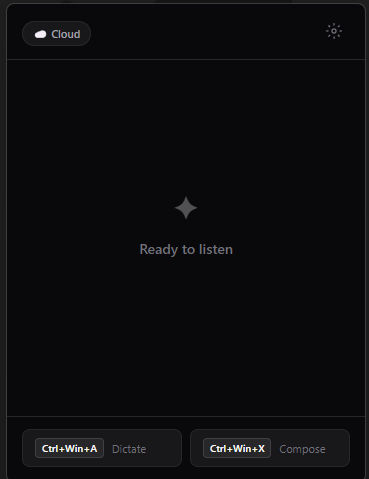
Everything You Need to Type Faster with Your Voice
ScribAI is a lightweight dictation tool that turns your voice into text instantly — no clicking, no switching apps, no learning curve.
Push-to-Talk Dictation
Hold Ctrl+Win+A, speak naturally, release. Text appears at your cursor instantly — in any Windows application. No microphone button to toggle, no dictation window to manage.
AI Compose — Write with Your Voice
Hold Ctrl+Win+X and describe what you want written. AI drafts polished emails, replies, Slack messages, and documents for you in seconds. Just describe it and ScribAI writes it.
Offline Speech Recognition
Run Whisper AI entirely on your PC — no internet connection needed, no audio data leaves your machine. Choose from multiple model sizes for the right balance of speed and accuracy.
OpenAI Cloud Transcription
Switch to OpenAI’s Whisper API for best-in-class accuracy when you need it. Use your own API key for full control over costs and data handling.
Blazing Fast Transcription
Local transcription completes in roughly two seconds. Cloud mode is even faster. No waiting, no loading screens — just speak and the text is there.
Lightweight & Privacy-First
A single installer under 100 MB, no admin rights needed. Runs quietly in your system tray using minimal CPU and RAM. ScribAI stores no audio and no transcription data.
See ScribAI in Action
Three steps. Zero learning curve. Start dictating in under 60 seconds.
Try It Right Now
No download needed — click the microphone and start speaking. This browser demo uses Web Speech API; the desktop app is far more accurate with Whisper AI.
🔒 Audio is processed locally in your browser — nothing is sent to any server.
For best accuracy, download the desktop app with Whisper AI.
Up and Running in 60 Seconds
No configuration needed. Download, install, and start dictating immediately.
Download & Install
Run the ScribAI installer — one click, no admin rights needed. Works on Windows 10 and Windows 11.
Choose Your Mode
Pick Local for fully offline, private transcription or OpenAI Cloud for maximum accuracy with your own API key.
Hold, Speak, Done
Hold the hotkey, talk naturally, release — your words are instantly pasted wherever your cursor is. Any app, any text field.
Who Uses ScribAI?
Professionals across industries use push-to-talk dictation to work faster and reduce typing strain.
Email Power Users
Draft and reply to dozens of emails per day without typing a single word. Dictate directly into Outlook, Gmail, or any email client. AI Compose can write professional replies from a short description.
Learn more →Healthcare Professionals
Dictate clinical notes, patient summaries, and documentation directly into your EHR system. Local mode keeps all audio on your machine — nothing is sent to the cloud.
Legal & Compliance
Draft contracts, case notes, and legal correspondence by voice. ScribAI works in Word, document management systems, and browser-based legal tools.
Developers & IT
Write documentation, commit messages, code comments, and Slack messages without leaving your IDE. ScribAI works in VS Code, terminals, and every text field on Windows.
Learn more →Writers & Content Creators
Capture ideas faster than you can type. Dictate blog posts, articles, social media content, and scripts directly into your writing tool of choice.
Learn more →Accessibility & RSI
Reduce typing strain and repetitive stress injuries. ScribAI lets you use your computer productively through voice input, with a simple push-to-talk interface that requires no mouse interaction.
Learn more →ADHD & Focus
Capture ideas before they disappear. Push-to-talk dictation keeps up with racing thoughts — hold a key, speak, release. No blank-page paralysis, no setup friction.
Learn more →Microsoft Word Users
Dictate into any version of Word — 2016, 2019, 2021, or 365. No add-ins, no Microsoft 365 subscription required. Works via clipboard for universal compatibility.
Learn more →Customer Support Agents
Write ticket responses 3x faster. Push-to-talk works in Zendesk, Freshdesk, Intercom, and every browser-based helpdesk. AI Compose polishes tone instantly.
Learn more →ScribAI vs. Other Dictation Tools
See how ScribAI compares to built-in Windows voice typing and other speech-to-text tools.
| Feature | ScribAI | Windows Voice Typing | Other Dictation Apps |
|---|---|---|---|
| Push-to-talk hotkey | ✔ Yes | ✘ Toggle only | Varies |
| Works in any app | ✔ Yes | Limited | Varies |
| Offline mode | ✔ Full Whisper AI | ✔ Basic | Rarely |
| AI writing / compose | ✔ GPT-powered | ✘ No | Rarely |
| Privacy (no data stored) | ✔ Yes | Cloud-dependent | Varies |
| System tray / background | ✔ Yes | ✘ No | Varies |
| Free tier | ✔ Full dictation free | ✔ Free | Often paid only |
| Multi-language support | ✔ 50+ languages | Limited | Varies |
| No admin rights needed | ✔ Yes | ✔ Yes | Sometimes |
ScribAI vs. Windows Voice Typing → · ScribAI vs. Dragon → · Whisper CLI vs. ScribAI → · 3-Way Comparison →
Simple, Transparent Pricing
Start dictating for free. Upgrade when you need AI writing and cloud transcription.
For individuals who want fast voice-to-text dictation
- ✔ Push-to-talk dictation
- ✔ Local Whisper AI (all models)
- ✔ System tray background mode
- ✔ Auto-paste to any Windows app
- ✔ Offline — no internet needed
- ✔ 50 dictations per day
- ✘ AI Compose
- ✘ OpenAI Cloud mode
For power users who want AI writing and cloud accuracy
- ✔ Everything in Free
- ✔ Unlimited dictations
- ✔ AI Compose (GPT-powered writing)
- ✔ OpenAI Cloud transcription
- ✔ Priority model downloads
- ✔ Multi-language support
- ✔ Use your own OpenAI API key
- ✔ Email support
Frequently Asked Questions
Everything you need to know about ScribAI dictation software.
Do I need an internet connection to use ScribAI?
Not in Local mode — Whisper AI runs entirely on your PC with no internet required. OpenAI Cloud mode and AI Compose do require an internet connection, but the core dictation feature works completely offline.
Does ScribAI work in every Windows application?
Yes. ScribAI pastes text at your cursor using the system clipboard, so it works in Outlook, Teams, Word, Chrome, Firefox, SAP, Notepad, VS Code, Notion — any application where you can type on Windows 10 or 11.
Is my audio data stored anywhere?
No. In Local mode, audio never leaves your machine and is discarded immediately after transcription. In Cloud mode, audio is sent to OpenAI’s API for transcription and is subject to their data policy — but ScribAI itself stores nothing.
What are the system requirements?
Windows 10 or Windows 11, 64-bit. The Tiny model needs approximately 200 MB of RAM. Larger models need more. No GPU is required, but having one will speed up transcription. ScribAI itself uses minimal CPU when idle in the system tray.
Can I use my own OpenAI API key?
Yes. Pro subscribers can optionally use their own API key for cloud transcription and AI Compose. Just add it in the Settings panel inside the app. This gives you full control over API costs.
How do I cancel my subscription?
Cancel anytime from your account dashboard. No questions asked, no contracts, no hidden fees. You'll continue to have access through the end of your billing period.
How is ScribAI different from Windows built-in voice typing?
ScribAI uses a push-to-talk hotkey (hold to dictate) which is faster and more precise than toggling a microphone on and off. It also uses Whisper AI for higher accuracy, supports multiple model sizes, works in every application (not just select ones), and includes AI Compose for writing complete emails and messages from a short description.
What languages does ScribAI support?
In Local mode, multi-language Whisper models support dozens of languages including English, Spanish, French, German, Chinese, Japanese, Arabic, Portuguese, and many more. In Cloud mode via the OpenAI API, all Whisper-supported languages are available. English-only models are also available for faster performance.
Ready to Type at the Speed of Speech?
Download ScribAI and start dictating in under 60 seconds. Free for Windows 10 and 11 — no account, no credit card.
⬇ Download ScribAI Free (99 MB)No signup required · No admin rights · Offline transcription included